
Hootsuite and SocialAutoUpload side by side
| SocialAutoUpload | Hootsuite | |
|---|---|---|
| Free plan | Yes: unlimited channels, 10 publishes / month | No; 14-day trial |
| Entry price | $5 / month (Creator, 150 publishes) | From $99 per user / month (Standard) |
| Pricing model | Flat plan; credits per successful publish | Per user seat, billed annually (monthly billing costs more) |
| Social accounts | Unlimited on every plan | 10 on Standard; unlimited from Professional ($199) |
| Facebook, Instagram | Yes | Yes |
| Telegram | Yes: channels and groups, plus posting from Telegram | Not listed |
| X, LinkedIn, Pinterest, Threads | No | X listed on the plans page |
| Inbox, brand monitoring, AI post and image generation | AI captions with your own key; no inbox or monitoring | Included from Standard |
| Team seats | One login per account | Buy as many user seats as you need |
Hootsuite details from hootsuite.com/plans, checked 11 November 2026. "Not listed" means the network wasn't named on that page. Prices change, so confirm on Hootsuite's site.
What a year costs
Hootsuite's price is per user seat, with an account limit on Standard. SocialAutoUpload's price depends on how much you publish, never on how many accounts you connect. Three scenarios, each with one post a day to every account:
| Scenario (1 user) | Publishes / month | SocialAutoUpload per year | Hootsuite per year (from) |
|---|---|---|---|
| Solo creator: 4 accounts | 120 | $60 (Creator, $5 × 12) | $1,188 (Standard, $99 × 12) |
| Small business: 8 accounts | 240 | $120 (Pro, $10 × 12) | $1,188 (Standard, $99 × 12) |
| Agency: 30 accounts | 900 | $360 (Agency, $30 × 12) | $2,388 (Professional, $199 × 12; Standard stops at 10 accounts) |
Hootsuite figures use its listed "from" price for one user, which is based on annual billing; each extra user seat adds to it. SocialAutoUpload plans are billed monthly with no annual contract.
The gap is large because the two products are built for different jobs. Hootsuite's price includes an inbox, brand monitoring and reporting for teams. If what you need is to get the same photo or video onto Facebook, Instagram, YouTube, TikTok and Telegram on time, SocialAutoUpload does that job from $5 a month.
What you get with SocialAutoUpload
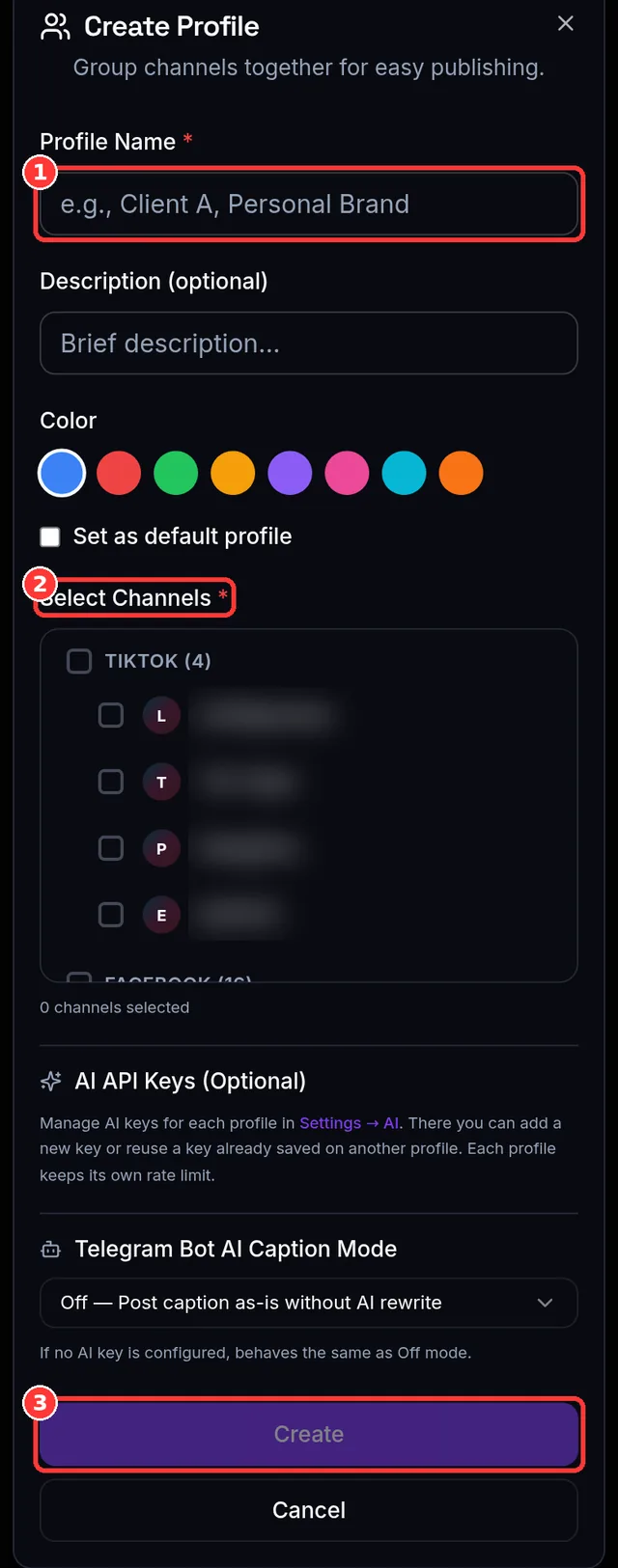
- Publish Now and Publishing Profiles. Save a set of channels as a profile (for example "Shop" = one Facebook Page, one Instagram account, one TikTok and one Telegram channel). Pick the profile and every channel in it is selected with one tap. Publish now or schedule it.
- Five platforms from one composer: Facebook Pages; Instagram Business or Creator accounts (connect with Log in with Instagram or through a Facebook Page); YouTube videos and Shorts; TikTok videos, photos and carousels of up to 35 images; Telegram channels and groups.
- Unlimited connected channels on every plan, Free included. The price doesn't change when you add a Page or a client.
- Pay per successful publish. 1 credit = one post published to one account. Failed or skipped channels don't use credits.
- Scheduling and a calendar on every plan.
- Post from your phone: the Android app on Google Play, or send media to your own Telegram bot.
- AI captions and hashtags with your own Gemini, OpenAI or DeepSeek key.
- Import your own media from a link instead of downloading and re-uploading it.
- Step-by-step guides in English and Burmese (Help Center).
- Pay by card on the website (Stripe), or through Google Play in the Android app.
What Hootsuite does well
Hootsuite is a full social media suite for teams and larger organisations. Its Standard plan lets you respond to messages from one inbox, monitor your brand and competitors, and generate posts and images with AI. Professional adds unlimited social accounts, automated inbox replies and custom performance reports, and Advanced adds approvals. It also publishes to X, which SocialAutoUpload doesn't. If your team spends the day answering comments and messages, that inbox is the part of Hootsuite you'd be paying for.
The SocialAutoUpload plans
| SocialAutoUpload plan | Price / month | Publish credits / month | Upload allowance | Publishing profiles | Connected channels |
|---|---|---|---|---|---|
| Free | $0 | 10 | 512 MB | 1 | Unlimited |
| Creator | $5 | 150 | 5 GB | 1 | Unlimited |
| Pro | $10 | 400 | 10 GB | 3 | Unlimited |
| Agency | $30 | 1,000 | 20 GB | Unlimited | Unlimited |
| Team | $55 | 2,500 | 50 GB | Unlimited | Unlimited |
Live numbers are always on the pricing page. Credits reset every month; Lesson 2 explains how they count.
Let AI agents and automations post everywhere through Telegram
This is the feature people don't expect. Connect your own Telegram bot to a Telegram channel in SocialAutoUpload and link it to a Publishing Profile. From then on, every post that appears in that channel is picked up and published to the Facebook Pages, Instagram accounts, YouTube channels and TikTok accounts in that profile. It doesn't matter who made the post:
- You, typing or forwarding a photo or video from your phone.
- The channel itself, when an admin posts as the channel.
- Another bot or an AI agent: an n8n or Make workflow, a custom GPT-style agent, a script on your own server, or any tool that can send a message to Telegram.
That makes Telegram a simple hand-off point for automation. Almost every automation platform already has a Telegram step, so your agent only needs to post into one Telegram channel. There is no SocialAutoUpload API key to request, store or rotate, and no developer app to register with Meta, Google or TikTok: the publishing runs through SocialAutoUpload's already-approved platform connections. Hootsuite doesn't list Telegram as a network on its pricing page, so this route isn't available there.
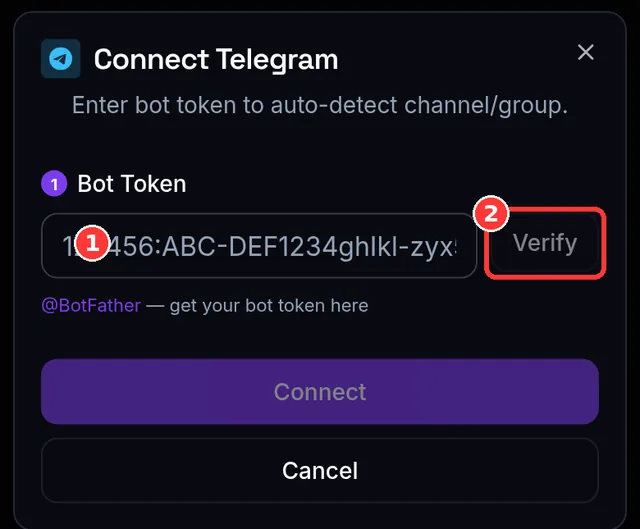
- Create a bot with Telegram's official @BotFather and connect it under Channels → Telegram (Lesson 5).
- Add the bot as an admin of your Telegram channel and link it to a Publishing Profile that holds your other channels (Lesson 6).
- Make your automation an admin of the same channel and let it post text, photos, videos or albums there. Each post is published to the profile and costs 1 credit per platform; the copy already in the Telegram channel costs nothing (Lesson 12).
Switching from Hootsuite in about ten minutes
- Create a free account with email or Google sign-in (Lesson 1). No card.
- Connect Facebook and Instagram with their official login (Lesson 3), then YouTube and TikTok (Lesson 4). Connecting here doesn't disconnect anything in Hootsuite.
- Add Telegram with your own bot (Lesson 5).
- Save a Publishing Profile for each brand or client (Lesson 6).
- Publish your first post (Lesson 7), then rebuild your queue with scheduling (Lesson 11). There is no automatic import of a Hootsuite queue, so schedule your next week or two of posts again in the composer.
Want the wider view? The social media scheduler pricing comparison covers Buffer, Later, Metricool, Publer, Postiz, SocialPilot and Sprout Social as well, and the free Hootsuite alternatives post compares free plans only.
Try it free
Create a free account (no card), connect your channels, save a Publishing Profile and publish your first post to all of them at once.
On Android? Get the SocialAutoUpload app on Google Play.
Frequently asked questions
Does Hootsuite have a free plan?
No. Hootsuite offers a 14-day free trial of its Standard, Professional and Advanced plans. There is no free plan on its plans page (checked 11 November 2026).
How much does Hootsuite cost per month?
Hootsuite's plans page lists Standard from $99, Professional from $199 and Advanced up to $399 per user per month, based on annual billing; monthly billing costs more per user. Standard includes 10 social accounts and Professional unlimited accounts.
What is a cheap Hootsuite alternative for a small business?
If you mainly need to publish and schedule posts to Facebook, Instagram, YouTube, TikTok and Telegram, SocialAutoUpload starts free and costs $5 to $55 a month flat, with unlimited connected channels and no per-channel fee.
Is there a Hootsuite alternative that posts to Telegram?
Yes. SocialAutoUpload publishes to Telegram channels and groups, and any post made in a connected Telegram channel can be published to your Facebook, Instagram, YouTube and TikTok accounts. Telegram was not listed on Hootsuite's plans page when we checked.
Does SocialAutoUpload have a social inbox like Hootsuite?
No. SocialAutoUpload focuses on publishing and scheduling. It does not offer a shared inbox for replying to comments and messages, social listening, or publishing to X, LinkedIn, Pinterest or Threads.
Buffer, Hootsuite, Later, Metricool, Publer, Postiz, SocialPilot and Sprout Social are trademarks of their respective owners. SocialAutoUpload is not affiliated with, endorsed by or sponsored by any of them.