Publishing Profiles: group your channels
What a profile is
A profile bundles together:
- A set of channels — for example "All my channels", or "Brand A only", or "Just Instagram + TikTok".
- Per-platform default settings — your usual YouTube privacy, TikTok options, and so on, so a loaded profile arrives pre-configured.
- An optional name, colour and icon to tell profiles apart at a glance.
Profiles matter in two places: in the composer you load one to fill your channel selection instantly, and your Telegram bot publishes to exactly the profile you linked it to in Lesson 5.
How many profiles you get
| Plan | Free | Creator | Pro | Agency |
|---|---|---|---|---|
| Publishing profiles | 1 | 2 | unlimited | unlimited |
On the Free plan you have a single profile — perfect for "all my channels". Managing separate brands or clients is where more profiles (and a paid plan) earn their keep. Try to create more than your plan allows and you'll see: Your free plan allows 1 publishing profile. Upgrade to create more.
Create a profile
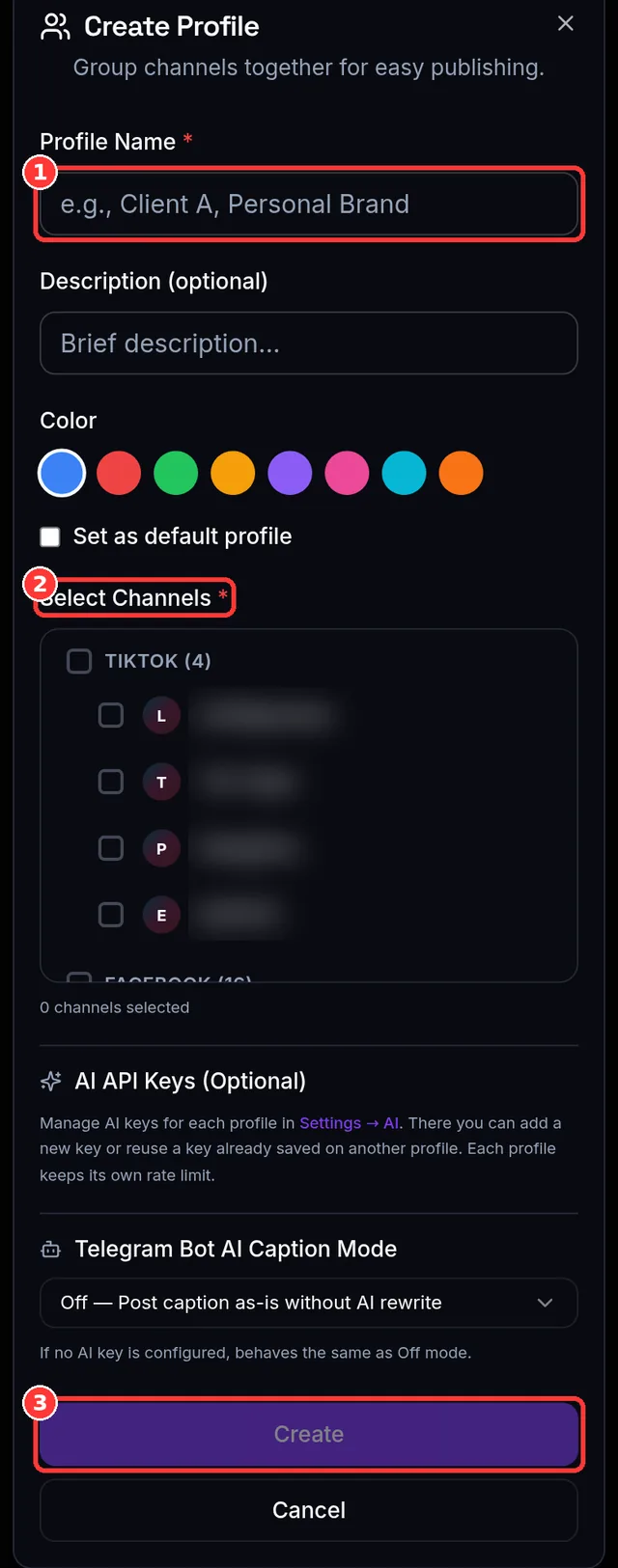
- On Channels, open Create Profile (the Dashboard's Get-Started card links here too).
- Give it a name (required) and pick the channels it should include (at least one).
- Optionally set a colour/icon, and mark it as your default — the default profile loads automatically in the composer.
- Save. It's now available in the composer's profile picker and as a link target for your Telegram bot.
Using a profile in the composer
- Open the composer and use the profile picker ("Load a saved profile…"). Choosing a profile selects its channels and applies its saved platform settings in one move.
- Choose All Channels to ignore profiles and hand-pick channels for a one-off post.
- Next to each profile you'll see a channel count. If it shows something like "(2/3)" in amber, one of the profile's channels was disconnected since you saved it — the profile still works with the channels that remain; re-save it to tidy the count.
Editing & keeping profiles tidy
- Edit a profile's channels, name, colour, or default flag any time from Channels.
- Saving platform settings while a profile is loaded in the composer updates that profile's defaults, so your preferences stick.
- When you disconnect a channel, it's automatically removed from every profile that used it — and any profile left with zero channels is deleted (a profile must always have at least one channel).
Expected result
You have at least one profile — ideally set as default — and opening the composer pre-selects its channels for you. If you connected a Telegram bot in Lesson 5, it's pointed at a profile too.
Common mistakes
- Trying to save a profile with no channels — at least one is required.
- Wondering why a profile shows "(1/2)" — a channel in it was disconnected; re-save to refresh, or reconnect the channel.
- On Free, trying to keep separate "personal" and "client" profiles — you get one profile; upgrade for more.
- Expecting the composer to remember hand-picked channels — use "All Channels" for one-offs, or save them as a profile to reuse.
📱 Mobile note: the profile picker sits at the top of the composer; tap it to swap channel sets without scrolling through every channel.
Everything so far has been setup. Now you'll actually publish — with compatibility checks, the confirm step, and reading your results.