Most social media schedulers cover Facebook, Instagram, YouTube and TikTok. Telegram is the one that usually gets left out — which is a problem if your channel is where your most loyal audience actually reads you. You end up scheduling four platforms in one tool and copy-pasting the same video into Telegram by hand.
SocialAutoUpload treats all five as equals: you compose a post once, choose any mix of Facebook Pages, Instagram, YouTube, TikTok and Telegram, pick a time, and each platform gets a version it accepts. There is a free plan, no credit card required. This guide shows exactly what each platform can take, what the free plan really includes, and how to judge any scheduler before you commit to it.
Start free — all 5 platforms →One post, five platforms: what each one accepts
"Supports TikTok" can mean very different things from one tool to another, so here is what actually happens when you publish through SocialAutoUpload today:
| Platform | What you can publish | Good to know |
|---|---|---|
| Facebook (Pages) | Text, photos, albums, links, videos, Reels | Short vertical videos go out as Reels automatically. |
| Instagram (Business / Creator) | Photos, carousels, videos as Reels; Stories via the Telegram bot | Needs media — no text-only posts. Reels up to 15 minutes / 300 MB; bigger files are fitted for you. |
| YouTube | Videos with title, description, tags, category, privacy and a custom thumbnail | Short vertical videos publish as Shorts. |
| TikTok | Videos, single photos and photo carousels (up to 35 images) | Direct publishing through TikTok's official API; you confirm TikTok's content declaration with one tap. |
| Telegram | Text, photos, videos and mixed albums | Posts through your own bot to a channel, group or private chat; no duration limit. |
If a selected platform can't take a particular post — a text-only update for YouTube, say — that channel is simply skipped, the composer tells you before you publish, and a skipped channel costs nothing. The full matrix, including deletion and media limits, is on the platform support page.
How it works
- Connect your accounts once. Facebook and Instagram through Meta's login, YouTube through Google, TikTok through TikTok's login, and Telegram by pasting a token from a free bot you create with @BotFather. There is no limit on how many channels you connect, on any plan.
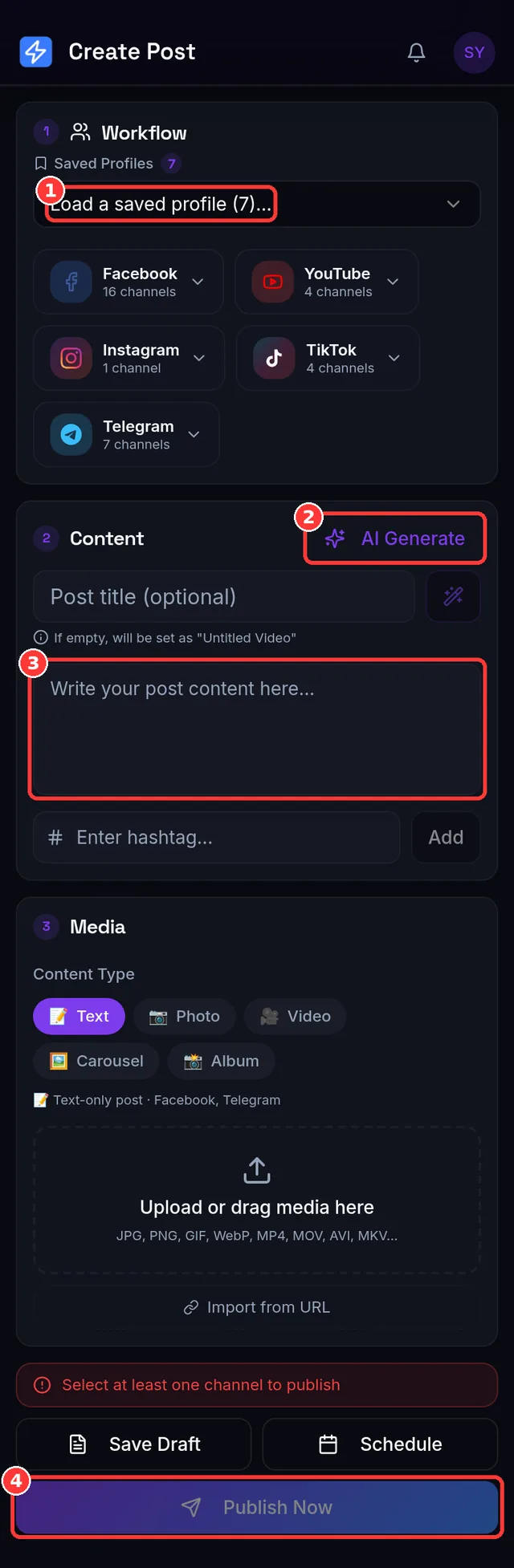
- Compose once. Upload a photo or video (up to 1 GB), or import media you own from a link. Write one caption — or let AI draft it — and adjust per platform where it matters, like the YouTube title or TikTok privacy.
- Publish now or schedule. Times use your device's timezone, so 18:00 means 6 PM where you are. Scheduled posts sit in a calendar you can drag, edit or publish early.
- See what happened, per platform. Every post shows a result and a live link for each channel. If one platform fails, you retry just that one — the others aren't posted twice and aren't charged twice.
Why Telegram is worth adding to the queue
Telegram's own apps let you schedule a message, but one chat at a time and only inside Telegram. That's fine for one channel; it doesn't help when the same video also has to go to a Reel, a Short and a TikTok. Adding Telegram to a cross-platform post costs one extra credit and no extra work, and it reaches people in a way the algorithm-driven feeds don't: every subscriber gets the post as a notification.
Two Telegram extras are easy to miss. First, the bot works in both directions — you can publish to all your platforms by simply sending a photo or video to your bot from your phone, with commands like /schedule 18:00. Second, you can get your publish results back in Telegram. The step-by-step setup is in how to auto-post to a Telegram channel.
What "free" actually includes
Free plans differ a lot, so here are the real numbers rather than a slogan:
- 10 publish credits a month. One credit is one successful publish to one account, so a post to all five platforms uses 5 credits; a post to just Facebook and Telegram uses 2. Failed and skipped publishes are free.
- 512 MB of uploads a month, counted once when a file arrives — not once per platform.
- Unlimited connected channels and unlimited posts per day.
- AI captions, hashtags and titles at no charge — they run on your own Google Gemini, OpenAI or DeepSeek API key, so they never use credits. Without a key the AI buttons simply ask you to add one.
Start on the free plan and run your channels for real. When you post more often, the flat paid plans start at $10/month for 150 credits — and every plan includes every platform, so Telegram and TikTok are never an add-on.
How to compare schedulers (an honest checklist)
Feature lists change often, so rather than quote other tools' plans — which may be out of date by the time you read this — here are the questions worth asking any scheduler. Check each tool's current pricing page for the answers.
- Is Telegram supported at all, and on which plan? Look for posting through the official Bot API to channels and groups, not just a link share.
- Does TikTok publish directly, or only send you a reminder? Some tools push a notification and leave the final step to you.
- Are photo carousels supported on TikTok and Instagram?
- Is pricing per channel, per user or flat? Per-seat pricing adds up fast for teams and agencies.
- What does the free plan cap? Channels, posts, uploads, or features — and is a credit card required?
- Can you see a result and link for every platform, and retry only what failed?
All five platforms in one tap: Publishing Profiles + Publish Now
The fastest daily workflow takes about ten seconds. Create a Publishing Profile once — for example "All my channels" with your Facebook Page, Instagram, YouTube, TikTok and Telegram inside — and it remembers your usual settings for each platform, like YouTube privacy and TikTok options.
- Open the composer and pick your profile — all five channels are selected for you.
- Add your video or photos and a caption.
- Press Publish Now — or Schedule — and every platform gets its post, each in the format it accepts.
Publish Now starts straight away: long videos keep uploading in the background, the results screen fills in platform by platform, and each one gives you a live link. Your Telegram bot can use the same profile, so a video you send to the bot from your phone lands on all five platforms too. The Free plan includes one profile — exactly right for "all my channels" — and paid plans add more for separate brands or clients (how profiles work).
Frequently asked questions
Is it really free? Yes. The Free plan includes 10 publish credits and 512 MB of uploads every month, with unlimited channels and no credit card. Paid plans are flat: Creator $10, Pro $15, Agency $35, Team $59 per month.
Can I post the same video to all five platforms at once? Yes — pick your Publishing Profile (or select the five channels), upload once and press Publish Now or Schedule. Each platform receives a format it accepts (Reel, Short, TikTok video, Telegram video).
Does TikTok posting need the TikTok app? No. Posts publish directly through TikTok's official Content Posting API. You confirm TikTok's content declaration with a single tap before publishing.
Do I need my own Telegram bot? Yes, and it's free: create one with @BotFather in about a minute. One bot posts to one chat, so a second channel means a second bot.
Is there a mobile app? Yes — the Android app on Google Play, and the website works on any phone browser.
Create your free account →