Telegram channels are one of the most direct distribution tools available: every post lands as a push notification on your subscribers' phones, with no algorithm deciding who sees it. That directness is why channels work so well for news, communities, deals pages and creator updates — and why posting consistently matters more on Telegram than almost anywhere else.
The catch is doing it manually every day. With SocialAutoUpload you connect your own Telegram bot once, and from then on you can auto-post to your Telegram channel on a schedule — and publish the same content to Facebook, Instagram, YouTube and TikTok in the same click. Free to start.
Auto-post to Telegram free →How Telegram auto-posting works (your own bot)
Telegram is unusual among the big platforms: automation isn't a grudging exception, it's a core feature. Bots are official, free, and fully supported. SocialAutoUpload publishes through your own bot — not a shared one — which means:
- Your channel is only ever touched by a bot you created and control.
- You can revoke everything instantly by removing the bot from the channel.
- No third-party bot brand appears anywhere near your content.
Setup, step by step
- Create your bot. In Telegram, message the official @BotFather, send
/newbot, pick a name — you'll get a bot token. This takes about a minute and is completely free. - Add the bot to your channel or group as an admin with permission to post.
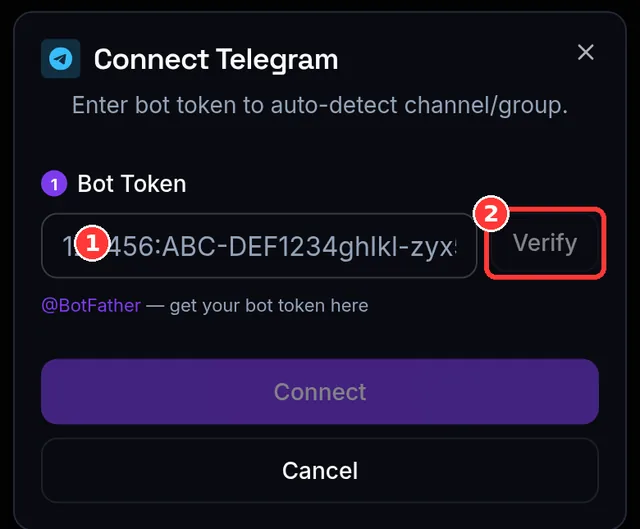
- Connect it in SocialAutoUpload. Paste the bot token on the Channels page; the setup scans for the channels and groups your bot can post to, and you pick the right one.
- Compose and schedule. Upload a photo or video, write the caption (or generate one with AI), pick the time — the bot publishes automatically, and your dashboard confirms it with the post link.
Post by messaging your bot — no dashboard needed
Once connected, the bot works in both directions. Besides scheduling from the web composer, you can publish to all your platforms by sending content to the bot in Telegram:
| You send the bot… | It publishes… |
|---|---|
| Text | A text post (to the platforms that accept text) |
| Photo + caption | A photo post |
| Video + caption | A video post — Reel / Short / TikTok as appropriate |
| Album (several photos or videos) | An album post |
The caption becomes the post text, incompatible platforms are skipped automatically, and the bot replies with the result and links for each channel. A few commands cover the rest: /schedule 18:00 (or /schedule 2026-10-01 09:00) queues the next thing you send, /unschedule cancels it, /reel or /story forces the content type, /auto goes back to automatic, /status checks the connection. After a command, send your content within five minutes.
/schedule 18:00 in the bot means 18:00 UTC+7 — the bot confirms the time it will use, labelled "(Thai Time)". In Myanmar (UTC+6:30) that's 30 minutes off your clock; plan for it.Big videos are fine — Telegram takes up to 1 GB
Telegram has no duration limit and SocialAutoUpload accepts files up to 1 GB, so a full-length video that Instagram would trim to 90 seconds posts to your channel untouched. Large uploads are chunked and resumable, and a video you've already uploaded for Facebook or YouTube doesn't have to be uploaded again — every selected platform publishes from the same file. Note that uploads and URL imports count toward your plan's monthly upload allowance once, when the file arrives, not per platform.
Channel vs group posting
Channels are one-way broadcast: only admins post, every subscriber gets notified — ideal for announcements, content drops and deals. Groups are conversations: the bot can post there too (as an admin), useful for communities where you want scheduled content to spark discussion. SocialAutoUpload supports both, and you stay in control of exactly which chat receives each post.
Why Telegram deserves a slot in your posting routine
- 100% delivery. No algorithm filters your reach — every subscriber gets the notification.
- No format gymnastics. Vertical, horizontal, long captions, files — Telegram takes your content as-is.
- Perfect cross-post target. The Reel you made for Instagram and TikTok posts to Telegram unchanged, so adding it to your queue costs nothing extra.
- Publish notifications, too. SocialAutoUpload can also notify you on Telegram when your posts (on any platform) go live — your channel and your ops both live in one app.
Practical tips for channel growth
- Respect the notification. Every post pings every subscriber — two or three good posts a day beat ten mediocre ones that teach people to mute you.
- Post at commute and evening hours when people actually check their phones (see our best-times guide).
- Batch weekly. Schedule the week's channel content in one sitting so the channel stays alive even when you're busy.
- Cross-promote. Put your channel link in your Instagram bio and TikTok profile — Telegram is where you convert followers into an audience you actually own.
Frequently asked questions
Do I need coding skills? None. Creating a bot is a chat conversation with @BotFather; connecting it is pasting one token.
Is this against Telegram's rules? No — bots posting to their own channels via the official Bot API is exactly how Telegram is designed to be used.
Can one bot serve multiple channels? No — each bot drives exactly one chat, and each bot can be connected to one account. For a second channel, create a second bot with @BotFather (one minute) and connect it the same way.
Does posting to Telegram cost a credit? Yes — 1 credit per platform a post lands on, Telegram included, so a post to Facebook + Instagram + YouTube + TikTok + your channel is 5 credits. The one exception: when you publish by sending content to the bot, the chat you sent it into isn't re-posted (your message is already there), so that chat isn't charged.
Is a group safe? Everything the bot publishes goes out under your account — so in a connected group, any member who posts media can trigger a publish under your name. Use a channel or your own private chat with the bot unless you trust every member.
What does it cost? The bot is free from Telegram. SocialAutoUpload's Free plan includes 10 publish credits and 512 MB of uploads a month with unlimited channels; flat paid plans start at $10/month (Creator 150 credits · Pro 400 · Agency 1,000 · Team 2,500).
Create your free account →