
Almost every automation tool can already talk to Telegram. n8n has a Telegram node, Make has a Telegram Bot module, and a custom GPT or Claude agent can call Telegram's Bot API in two lines of code. Getting the same content onto Facebook, Instagram, YouTube and TikTok is the hard part: four sets of app reviews, tokens that expire, and upload rules that differ per platform.
SocialAutoUpload turns a Telegram channel into the front door for all of them. Connect your own Telegram bot to the channel once, link it to a Publishing Profile, and from then on every post that lands in that channel is published to the Facebook Pages, Instagram accounts, YouTube channels and TikTok accounts in that profile. It doesn't matter who made the post: you in the Telegram app, the channel itself, or another bot or AI agent. There's no API key to request and no code to write on our side. Your agent only has to post to Telegram.
Start free, no card →Who this is for
- AI-agent builders. Your agent writes a caption, renders an image or cuts a short clip. Posting it into a Telegram channel is one Bot API call, and the rest happens here.
- Automation users (n8n, Make, Zapier-style flows). RSS to post, new product to post, new YouTube upload to Shorts and Reels: end the flow with "send to Telegram channel" and you're done.
- Agencies and teams. A Telegram channel per client works as an approval-free outbox. Whoever (or whatever) posts there publishes to that client's profile.
- Telegram-first creators. You already run a channel. Now every channel post goes everywhere else, too.
How it works, in five steps
- Create a bot in @BotFather. In Telegram, message the official @BotFather, send
/newbotand pick a name. You get a bot token. This bot belongs to you and is the one SocialAutoUpload listens through. - Make a Publishing Profile. On the website, open Channels, connect your Facebook Page, Instagram, YouTube and TikTok accounts, and save them as a Publishing Profile (Lesson 6).
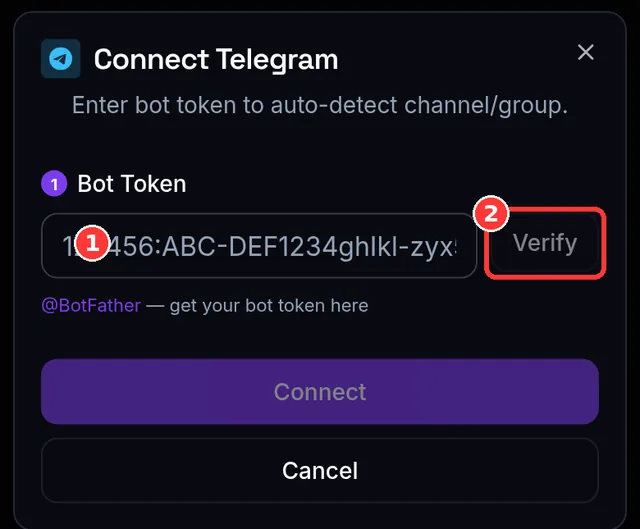
- Connect the bot in Channels. Tap the Telegram tile, paste the token, add the bot as an admin of your channel, post any message there, then pick the channel from the list and link the profile (Lesson 5).
- Let your agent post to the channel. Give your agent or automation its own bot (a second one from @BotFather), make it a channel admin with "Post messages", and have it call
sendMessage,sendPhoto,sendVideoorsendMediaGroup. A person posting in the Telegram app, or a post signed as the channel, works exactly the same. - We publish it everywhere. Your SocialAutoUpload bot sees the new channel post, downloads the media and publishes it to every account in the linked profile. Results and links show on the Posts page.
The post is already in your Telegram channel, so it isn't posted there a second time, and that one costs no credit. Each other platform it lands on uses 1 credit, so a channel post that goes to Facebook, Instagram, YouTube and TikTok uses 4.
A minimal example (any language, any agent)
This is all your agent needs: Telegram's own Bot API, called with the agent's bot token. Nothing here talks to SocialAutoUpload directly.
curl -F "chat_id=@your_channel" \
     -F "caption=New drop is live. Link in bio." \
     -F "video=@./clip.mp4" \
     https://api.telegram.org/bot<AGENT_BOT_TOKEN>/sendVideo
For a private channel, use its numeric ID (it starts with -100) instead of the @username. For several photos or videos in one post, use sendMediaGroup and put the caption on the first item.
Example: an n8n or Make flow, described in words
- Trigger: a schedule (every day at 09:00), a new row in Google Sheets, a new RSS item, or a webhook from your app.
- AI step: an OpenAI, Gemini or Claude node writes the caption from the row or article. Optionally an image or video step creates or fetches the media file.
- Telegram step: the Telegram node (n8n) or Telegram Bot module (Make), using your agent's bot credentials, sends a photo or video with that caption to your channel.
- Done. Seconds later the post is live on your Facebook Page, Instagram, YouTube and TikTok. No social-media nodes, OAuth apps or platform tokens are needed in the flow itself.
The same pattern works for a custom agent built on the OpenAI Assistants or Claude tool-use APIs: give it a "post_to_telegram" tool that wraps the call above.
Tips that save you a retry
- One post = one media group. An album sent with
sendMediaGroupbecomes one album post. Sending five separate photos in a row makes five posts. - The caption becomes the post text. For an album, the first caption found is used. Platforms that need media skip text-only posts automatically: a text post goes to your Facebook Page, while Instagram, YouTube and TikTok wait for a photo or video (YouTube needs a video).
- Use a separate bot for your agent. Don't reuse the token you connected to SocialAutoUpload. That bot's updates are delivered to us, and a bot doesn't receive its own messages.
- Use a channel, not a group. Telegram's Bot FAQ says bots don't see messages from other bots. Posts in a channel arrive as channel posts, which is the setup we tested with other bots and agents.
- Mind Telegram's bot upload limit. Through Telegram's cloud Bot API, a bot can send files up to 50 MB (Bot API docs). For longer videos, post from the Telegram app or run Telegram's local Bot API server. On our side, the bot accepts files up to 2 GB.
- Scheduling: channel posts publish right away, so let your automation decide the time (n8n's Schedule trigger, a cron job). If you'd rather queue posts by hand, connect a separate bot to your private chat with it and send
/schedule 18:00before your content. Bot times are Thai time (UTC+7). The web composer schedules in your own local time (Lesson 12). - AI captions per platform: set the profile's Telegram Bot AI Caption Mode to Auto, and with your own AI key added the bot rewrites each caption before publishing. Leave it Off to post your agent's text exactly as written.
- Keep the channel quiet: by default the bot replies in the channel with links only. Turn it off in Settings → Telegram bot replies → Reply in channels and check results on the Posts page instead.
- Guard the admin list. Anything posted in the connected channel publishes under your account, so give admin rights only to people and bots you trust.
Why a Telegram channel makes a good agent outbox
A channel gives you a public, timestamped log of everything your agent published. You can read and fix it from your phone. You can also pause the whole pipeline in one tap by removing the agent's bot. Because publishing runs through SocialAutoUpload's approved platform apps, your automation never handles Facebook, Instagram, Google or TikTok tokens, and those tokens never sit inside a flow export or an agent's prompt. When a platform changes its upload rules, you don't have to rebuild anything.
Prefer clicking? The same Publishing Profile works in the web composer and the Android app: write once, tap Publish Now, and all five platforms go out together.
Frequently asked questions
Do I need an API key from SocialAutoUpload?
No. There's no API key and nothing to code on our side. Your agent posts to a Telegram channel with Telegram's own Bot API, and your connected SocialAutoUpload bot picks the post up from there.
Will posts made by another bot really be published?
Yes. When your SocialAutoUpload bot is an admin of the channel it is connected to, every post in that channel is picked up, whether a person, the channel itself, or another bot or AI agent made it, and published to the accounts in the linked Publishing Profile.
Which platforms does a channel post go to?
To the Facebook Pages, Instagram accounts, YouTube channels and TikTok accounts in the Publishing Profile linked to the bot. A post that a platform can't take, like text-only for YouTube, is skipped for that platform automatically.
How many credits does an agent post use?
1 credit per platform it is published to. The Telegram channel it came from is not re-posted and costs nothing, so a post to Facebook, Instagram, YouTube and TikTok uses 4 credits. The Free plan includes 10 credits a month. Paid plans start at $5 a month for 150.
Can I connect several channels, one per client?
Yes. Each bot drives exactly one chat, so create one bot per channel with @BotFather and connect each to its own Publishing Profile. Free and Creator include 1 profile, Pro 3, and Agency and Team have no profile limit.
Is this allowed by Telegram?
Yes. Bots posting to channels through the official Bot API, and bots reading channels where they are admins, are standard Telegram features.
Telegram, Facebook, Instagram, YouTube, TikTok, n8n, Make, Zapier, OpenAI, Gemini and Claude are trademarks of their respective owners. SocialAutoUpload is not affiliated with or endorsed by them.