
Automation tool အများစုက Telegram ကို ပို့လို့ရပြီးသားပါ။ n8n မှာ Telegram node ရှိတယ်၊ Make မှာ Telegram Bot module ရှိတယ်၊ ကိုယ်တိုင်ရေးထားတဲ့ GPT ဒါမှမဟုတ် Claude agent ကလည်း Telegram Bot API ကို code နှစ်ကြောင်းနဲ့ ခေါ်လို့ရပါတယ်။ ခက်တာက အဲ့ content ကိုပဲ Facebook၊ Instagram၊ YouTube၊ TikTok ကို တင်ဖို့ပါ — platform တစ်ခုချင်းစီရဲ့ app review၊ သက်တမ်းကုန်တတ်တဲ့ token တွေ၊ မတူညီတဲ့ upload စည်းမျဉ်းတွေ ရှိလို့ပါ။
SocialAutoUpload က Telegram channel တစ်ခုကို platform အားလုံးရဲ့ အဝင်တံခါး ဖြစ်အောင် လုပ်ပေးပါတယ်။ ကိုယ်ပိုင် Telegram bot ကို channel နဲ့ တစ်ခါချိတ်၊ Publishing Profile တစ်ခုနဲ့ ချိတ်ထားလိုက်ရင် အဲ့ channel ထဲ ရောက်လာတဲ့ ပို့စ်တိုင်းကို profile ထဲက Facebook Page၊ Instagram၊ YouTube နဲ့ TikTok account တွေဆီ တင်ပေးပါတယ်။ ဘယ်သူတင်တာလဲ အရေးမကြီးပါ — သင်ကိုယ်တိုင် Telegram app ကနေ တင်တာ၊ channel နာမည်နဲ့ တင်တာ၊ ဒါမှမဟုတ် တခြား bot / AI agent က တင်တာ — အားလုံး အလုပ်လုပ်ပါတယ်။ ကျွန်တော်တို့ဘက်မှာ API key တောင်းစရာ မလို၊ code ရေးစရာ မလိုပါ။ သင့် agent က Telegram ကို တင်ရုံပါပဲ။
အခမဲ့ စတင်ပါ — card မလို →ဘယ်သူတွေအတွက်လဲ
- AI agent တည်ဆောက်သူများ — agent က caption ရေး၊ ပုံထုတ်၊ ဗီဒီယိုတို ဖြတ်ပြီး Telegram channel ထဲ Bot API call တစ်ခုနဲ့ တင်လိုက်ရင် ကျန်တာ ကျွန်တော်တို့ လုပ်ပေးပါတယ်။
- Automation သုံးသူများ (n8n၊ Make၊ Zapier လို flow) — RSS ကနေ post၊ product အသစ်ကနေ post — flow အဆုံးမှာ "Telegram channel ကို ပို့" ထည့်ရုံပါ။
- Agency နဲ့ team များ — client တစ်ယောက်ကို channel တစ်ခုစီ ထားပြီး အဲ့ channel ထဲ တင်သမျှ (လူဖြစ်ဖြစ်၊ bot ဖြစ်ဖြစ်) အဲ့ client ရဲ့ profile ဆီ ရောက်ပါတယ်။
- Telegram ကို အဓိကသုံးတဲ့ creator များ — channel ရှိပြီးသားဆိုရင် channel ပို့စ်တိုင်း တခြား platform တွေဆီပါ ရောက်သွားပါမယ်။
အလုပ်လုပ်ပုံ — အဆင့် ၅ ဆင့်
- @BotFather မှာ bot ဖန်တီးပါ။ Telegram မှာ တရားဝင် @BotFather ကို
/newbotပို့ပြီး နာမည်ရွေးရင် bot token ရပါမယ်။ ဒီ bot က သင်ပိုင်ပြီး SocialAutoUpload က ဒီ bot ကနေ နားထောင်ပါတယ်။ - Publishing Profile ဖွဲ့ပါ။ Website မှာ Channels ကိုဖွင့်၊ Facebook Page၊ Instagram၊ YouTube၊ TikTok ကို ချိတ်ပြီး Publishing Profile အဖြစ် သိမ်းပါ (သင်ခန်းစာ ၆)။
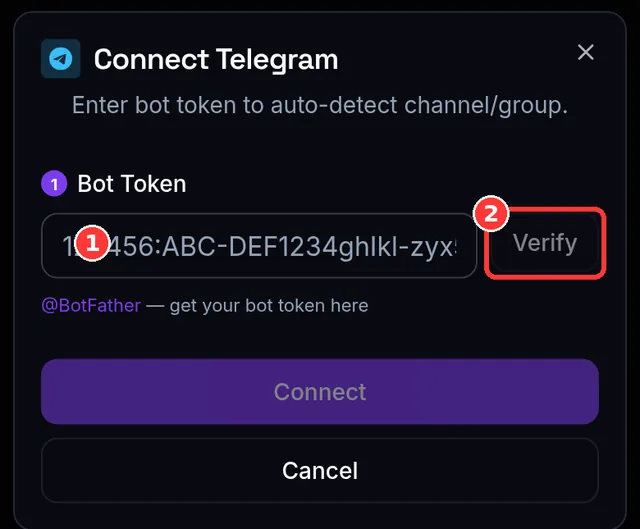
- Channels မှာ bot ကို ချိတ်ပါ။ Telegram tile ကိုနှိပ်၊ token paste လုပ်၊ bot ကို channel admin အဖြစ်ထည့်၊ channel ထဲ message တစ်ခုခု ပို့ပြီး list ထဲက channel ကိုရွေး၊ profile ချိတ်ပါ (သင်ခန်းစာ ၅)။
- Agent ကို channel ထဲ တင်ခိုင်းပါ။ Agent / automation အတွက် သီးသန့် bot တစ်ခု (@BotFather ကနေ ဒုတိယ bot) ဖန်တီး၊ "Post messages" ခွင့်နဲ့ channel admin ပေးပြီး
sendMessage၊sendPhoto၊sendVideoဒါမှမဟုတ်sendMediaGroupကို ခေါ်ခိုင်းပါ။ လူက Telegram app ကနေ တင်တာ၊ channel နာမည်နဲ့ တင်တာလည်း အတူတူပါပဲ။ - Platform အားလုံးဆီ တင်ပေးပါတယ်။ SocialAutoUpload bot က channel ပို့စ်အသစ်ကို မြင်တာနဲ့ media ကို download လုပ်ပြီး ချိတ်ထားတဲ့ profile ထဲက account အားလုံးဆီ တင်ပါတယ်။ ရလဒ်နဲ့ link တွေကို Posts စာမျက်နှာမှာ ကြည့်နိုင်ပါတယ်။
ပို့စ်က Telegram channel ထဲ ရှိပြီးသားမို့ အဲ့ channel ကို ထပ်မတင်ပါ၊ credit လည်း မယူပါ။ တခြား platform တစ်ခုစီအတွက် credit ၁ ကုန်လို့ Facebook၊ Instagram၊ YouTube၊ TikTok ကို ရောက်တဲ့ channel ပို့စ်တစ်ခုက credit ၄ ပါ။
အတိုဆုံး ဥပမာ
သင့် agent လိုတာ ဒါပဲပါ — agent ရဲ့ bot token နဲ့ Telegram Bot API ကို ခေါ်တာပါ။ SocialAutoUpload ကို တိုက်ရိုက် မခေါ်ပါ။
curl -F "chat_id=@your_channel" \
     -F "caption=New drop is live. Link in bio." \
     -F "video=@./clip.mp4" \
     https://api.telegram.org/bot<AGENT_BOT_TOKEN>/sendVideo
Private channel ဆိုရင် @username အစား -100 နဲ့စတဲ့ ID နံပါတ်ကို သုံးပါ။ ပုံ / ဗီဒီယို အများကြီးကို ပို့စ်တစ်ခုတည်းအဖြစ် တင်ချင်ရင် sendMediaGroup သုံးပြီး caption ကို ပထမ item မှာ ထည့်ပါ။
ဥပမာ — n8n / Make flow တစ်ခု
- Trigger: အချိန်ဇယား (နေ့တိုင်း မနက် ၉ နာရီ)၊ Google Sheets row အသစ်၊ RSS item အသစ် ဒါမှမဟုတ် သင့် app ရဲ့ webhook။
- AI အဆင့်: OpenAI၊ Gemini ဒါမှမဟုတ် Claude node က row / ဆောင်းပါးကနေ caption ရေးပါတယ်။ လိုရင် ပုံ / ဗီဒီယို ထုတ်တဲ့ အဆင့် ထည့်ပါ။
- Telegram အဆင့်: n8n ရဲ့ Telegram node ဒါမှမဟုတ် Make ရဲ့ Telegram Bot module က agent bot နဲ့ ပုံ / ဗီဒီယိုကို caption နဲ့တကွ channel ထဲ ပို့ပါတယ်။
- ပြီးပါပြီ။ စက္ကန့်အနည်းငယ်အတွင်း Facebook Page၊ Instagram၊ YouTube၊ TikTok မှာ ပို့စ် ပေါ်လာပါမယ်။ Flow ထဲမှာ social media node၊ OAuth app၊ platform token တစ်ခုမှ မလိုပါ။
OpenAI Assistants ဒါမှမဟုတ် Claude tool use နဲ့ ရေးထားတဲ့ agent ဆိုလည်း အထက်က call ကို "post_to_telegram" tool တစ်ခုအဖြစ် ပေးလိုက်ရုံပါ။
ပြန်တင်ရတာ သက်သာစေမယ့် အကြံပြုချက်များ
- ပို့စ်တစ်ခု = media group တစ်ခု။
sendMediaGroupနဲ့ ပို့တဲ့ album က album ပို့စ်တစ်ခု ဖြစ်ပါတယ်။ ပုံ ၅ ပုံကို တစ်ပုံချင်း ပို့ရင် ပို့စ် ၅ ခု ဖြစ်ပါမယ်။ - Caption က ပို့စ်စာသား ဖြစ်ပါတယ်။ Album ဆိုရင် ပထမဆုံးတွေ့တဲ့ caption ကို သုံးပါတယ်။ စာသားသက်သက် ပို့စ်က Facebook Page ကို ရောက်ပြီး Instagram၊ YouTube၊ TikTok ကတော့ ပုံ ဒါမှမဟုတ် ဗီဒီယို လိုလို့ အလိုအလျောက် skip ပါတယ် (YouTube က ဗီဒီယိုပဲ)။
- Agent အတွက် bot သီးသန့် သုံးပါ။ SocialAutoUpload နဲ့ ချိတ်ထားတဲ့ token ကို ပြန်မသုံးပါနဲ့ — အဲ့ bot ရဲ့ update တွေက ကျွန်တော်တို့ဆီ ရောက်ပြီး bot တစ်ခုက ကိုယ်တိုင်ပို့တဲ့ message ကို ပြန်မမြင်ပါ။
- Group မဟုတ်ဘဲ channel သုံးပါ။ Telegram ရဲ့ Bot FAQ အရ bot တွေက တခြား bot ရဲ့ message ကို မမြင်ပါ။ Channel ထဲက ပို့စ်တွေကတော့ channel post အဖြစ် ရောက်လာလို့ တခြား bot / agent တွေနဲ့ စမ်းထားတာ ဒီ setup ပါ။
- Telegram ရဲ့ bot upload ကန့်သတ်ချက်။ Telegram cloud Bot API ကနေ bot တစ်ခု ပို့နိုင်တဲ့ file က 50 MB အထိပါ (Bot API docs)။ ဗီဒီယိုရှည်ဆိုရင် Telegram app ကနေ တင်ပါ ဒါမှမဟုတ် Telegram ရဲ့ local Bot API server ကို သုံးပါ။ ကျွန်တော်တို့ဘက်က bot က 2 GB အထိ လက်ခံပါတယ်။
- Schedule: Channel ပို့စ်တွေက ချက်ချင်း တင်ပါတယ် — ဒါကြောင့် အချိန်ကို automation က ဆုံးဖြတ်ပါစေ (n8n Schedule trigger၊ cron)။ လက်နဲ့ queue ထားချင်ရင် bot တစ်ခုကို သင့် private chat နဲ့ ချိတ်ပြီး content မပို့ခင်
/schedule 18:00ပို့ပါ။ Bot အချိန်က ထိုင်းစံတော်ချိန် (UTC+7) ပါ — မြန်မာအချိန်ထက် မိနစ် ၃၀ စောလို့ မြန်မာ ညနေ ၆ နာရီအတွက်/schedule 18:30ပို့ပါ။ Web composer ကတော့ သင့် local time နဲ့ပါ (သင်ခန်းစာ ၁၂)။ - Platform အလိုက် AI caption: Profile ရဲ့ Telegram Bot AI Caption Mode ကို Auto ထားပြီး ကိုယ်ပိုင် AI key ထည့်ထားရင် bot က caption ကို မတင်ခင် ပြန်ရေးပေးပါတယ်။ Off ထားရင် agent ရေးတဲ့အတိုင်း တင်ပါတယ်။
- Channel ကို တိတ်ဆိတ်အောင် ထားချင်ရင်: ပုံမှန်အားဖြင့် bot က channel ထဲ link တွေနဲ့ ပြန်ဖြေပါတယ်။ Settings → Telegram bot replies → Reply in channels ကို ပိတ်ပြီး ရလဒ်ကို Posts စာမျက်နှာမှာ ကြည့်ပါ။
- Admin စာရင်းကို ဂရုစိုက်ပါ။ ချိတ်ထားတဲ့ channel ထဲ တင်သမျှ သင့် account နဲ့ ထွက်လို့ ယုံကြည်တဲ့ လူ / bot ကိုပဲ admin ပေးပါ။
Telegram channel က agent outbox အဖြစ် ဘာလို့ ကောင်းလဲ
Channel က agent တင်ခဲ့သမျှကို အချိန်နဲ့တကွ မှတ်တမ်းတင်ထားပေးလို့ ဖုန်းကနေ ဖတ်လို့၊ ပြင်လို့ ရပါတယ်။ Agent ရဲ့ bot ကို ဖယ်လိုက်ရုံနဲ့ pipeline တစ်ခုလုံးကို ချက်ချင်း ရပ်နိုင်ပါတယ်။ Publish လုပ်တာက SocialAutoUpload ရဲ့ approved platform app တွေကနေ ဖြစ်လို့ သင့် automation က Facebook၊ Instagram၊ Google၊ TikTok token တွေကို ဘယ်တော့မှ မကိုင်ရပါ — flow export ထဲ၊ agent prompt ထဲ token မရှိပါ။ Platform တစ်ခုက upload စည်းမျဉ်း ပြောင်းရင်လည်း ဘာမှ ပြန်ဆောက်စရာ မလိုပါ။
နှိပ်ပြီး တင်တာ ပိုကြိုက်ရင် အဲ့ Publishing Profile ကိုပဲ web composer နဲ့ Android app မှာ သုံးနိုင်ပါတယ် — တစ်ခါရေး၊ Publish Now နှိပ်လိုက်ရင် platform ၅ ခုလုံး တစ်ပြိုင်နက် ထွက်ပါတယ်။
မေးလေ့ရှိသော မေးခွန်းများ
SocialAutoUpload ကနေ API key လိုလား?
မလိုပါ။ ကျွန်တော်တို့ဘက်မှာ API key လည်း မရှိ၊ code ရေးစရာလည်း မလိုပါ။ သင့် agent က Telegram ရဲ့ Bot API နဲ့ channel ထဲ တင်ပြီး ချိတ်ထားတဲ့ SocialAutoUpload bot က အဲ့ကနေ ယူတင်ပါတယ်။
တခြား bot တင်တဲ့ ပို့စ်တွေကိုလည်း တကယ် တင်ပေးလား?
တင်ပေးပါတယ်။ SocialAutoUpload bot က ချိတ်ထားတဲ့ channel ရဲ့ admin ဖြစ်နေရင် အဲ့ channel ထဲက ပို့စ်တိုင်း — လူတင်တာ၊ channel နာမည်နဲ့ တင်တာ၊ တခြား bot / AI agent တင်တာ — ကို ယူပြီး ချိတ်ထားတဲ့ Publishing Profile ထဲက account တွေဆီ တင်ပါတယ်။
Channel ပို့စ်က ဘယ် platform တွေကို ရောက်လဲ?
Bot နဲ့ ချိတ်ထားတဲ့ Publishing Profile ထဲက Facebook Page၊ Instagram၊ YouTube channel နဲ့ TikTok account တွေဆီ ရောက်ပါတယ်။ Platform တစ်ခုက လက်မခံတဲ့ ပို့စ် (ဥပမာ YouTube အတွက် စာသားသက်သက်) ကို အဲ့ platform အတွက် အလိုအလျောက် skip ပါတယ်။
Agent ပို့စ်တစ်ခုက credit ဘယ်လောက် ကုန်လဲ?
တင်တဲ့ platform တစ်ခုစီအတွက် credit ၁ ပါ။ မူရင်း Telegram channel ကို ထပ်မတင်လို့ credit မယူပါ — ဒါကြောင့် Facebook၊ Instagram၊ YouTube၊ TikTok ဆိုရင် credit ၄ ပါ။ Free plan မှာ တစ်လ credit ၁၀ ပါပြီး paid plan တွေက တစ်လ $5 (credit ၁၅၀) ကစပါတယ်။
Client တစ်ယောက်ကို channel တစ်ခုစီ ချိတ်လို့ရလား?
ရပါတယ်။ Bot တစ်ခုက chat တစ်ခုတည်းကိုပဲ မောင်းလို့ channel တစ်ခုစီအတွက် @BotFather မှာ bot တစ်ခုစီ ဖန်တီးပြီး ကိုယ်ပိုင် Publishing Profile နဲ့ ချိတ်ပါ။ Free နဲ့ Creator မှာ profile ၁ ခု၊ Pro မှာ ၃ ခု၊ Agency နဲ့ Team မှာ profile အကန့်အသတ် မရှိပါ။
Telegram က ခွင့်ပြုလား?
ခွင့်ပြုပါတယ်။ Bot တွေက တရားဝင် Bot API နဲ့ channel ကို တင်တာ၊ admin ဖြစ်နေတဲ့ channel ကို ဖတ်တာက Telegram ရဲ့ ပုံမှန် feature တွေပါ။
Telegram၊ Facebook၊ Instagram၊ YouTube၊ TikTok၊ n8n၊ Make၊ Zapier၊ OpenAI၊ Gemini နဲ့ Claude တို့က သက်ဆိုင်ရာ ပိုင်ရှင်တွေရဲ့ trademark တွေ ဖြစ်ပါတယ်။ SocialAutoUpload က သူတို့နဲ့ ဆက်စပ်မှု မရှိပါ။