Analytics
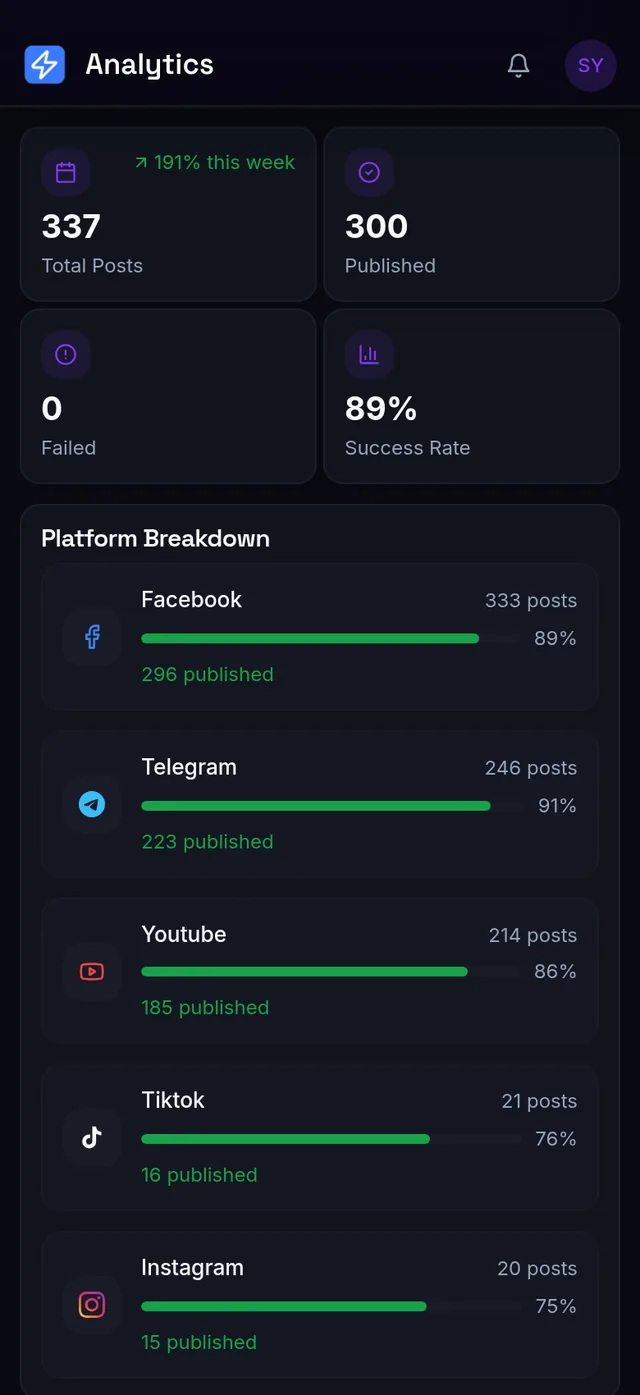
Analytics — how your publishing is doing
The Analytics page summarizes your publishing activity from this app's own records:
- Total Posts, with a week-over-week change.
- Published and Failed counts.
- Success Rate — of the posts actually attempted (drafts and scheduled don't count).
- Platform Breakdown — published vs failed per platform, so you can see which platform is giving you trouble.
What isn't available (be clear-eyed about this)
Real engagement metrics — views, likes, comments, reach — aren't shown inside the app for any platform, including YouTube. If you need those numbers, use each platform's own insights or creator tools (YouTube Studio, Instagram Insights, TikTok Analytics, Facebook Page insights). This is a genuine limitation, not a setting you've missed.
Expected result
You know exactly what Analytics measures: did my posts publish successfully, across every connected platform. And you know not to expect like/view counts inside the app for any of them — check each platform's own tools for that.
Common mistakes
- Expecting likes/views inside the app — no platform's real engagement numbers are shown here, check that platform's own tools instead.
- Reading Success Rate as engagement — it measures publishing success, not audience response.
- Looking for Analytics on Free — it's a Creator-and-up feature.
Troubleshooting (quick table)
| Situation | What it means | Do this |
|---|---|---|
| No engagement numbers (views/likes) in the app | The app doesn't provide them yet, for any platform | Use each platform's own insights tools |
| Analytics page is locked | It's a paid feature | Upgrade (Lesson 2) |
📱 Mobile note: the Analytics page works on mobile; the platform breakdown is easier to scan on a larger screen.
Read your usage banners, understand what each limit means, and learn the contact-to-buy upgrade path.